

Why Integrate Digital Screens Into Retail Fixtures?
Digital retail fixtures combine physical product merchandising with screen-based content in a single, purpose-built display. Rather than placing a television next to a shelf, the screen becomes part of the fixture itself, with its mounting, power, ventilation, and service access considered from the beginning.
For retailers and consumer brands, that opens up practical possibilities. A digital header can promote a seasonal offer without a new printed graphic. An embedded screen can demonstrate a product beside the merchandise. An interactive display can help shoppers compare options when a sales associate is not nearby.
The important distinction is integration. A successful display must do more than look attractive on a rendering. It needs to protect the technology, preserve merchandise space, and work reliably in a real store. That starts with selecting the right type of screen and engineering the fixture around it.
Choosing the Right Digital Display for the Fixture
Different screens serve different purposes. Before selecting hardware, determine what the shopper should be able to see or do at the fixture.
Embedded Digital Screens
Embedded screens fit within endcaps, shelving systems, product showcases, and other custom retail fixtures. They are useful for product demonstrations, instructional videos, and brand storytelling close to the merchandise. The fixture should frame the screen without blocking its ventilation openings or making removal difficult.
Interactive Touchscreen Displays
Touchscreens work best when a customer needs to take action, such as comparing products, browsing finishes, or exploring product specifications. Unlike a passive screen, an interactive display requires attention to reach height, touch accuracy, interface design, accessibility, cleaning, and the shopper’s position in the aisle.
Digital Headers and Promotional Screens
A digital header introduces flexible messaging above a merchandise display. This approach can be effective for changing campaigns, promotions, and product launches while keeping the space below available for physical products. Brightness and viewing distance are particularly important when the message needs to be read from an aisle.
Key Engineering Considerations for Digital Retail Fixtures
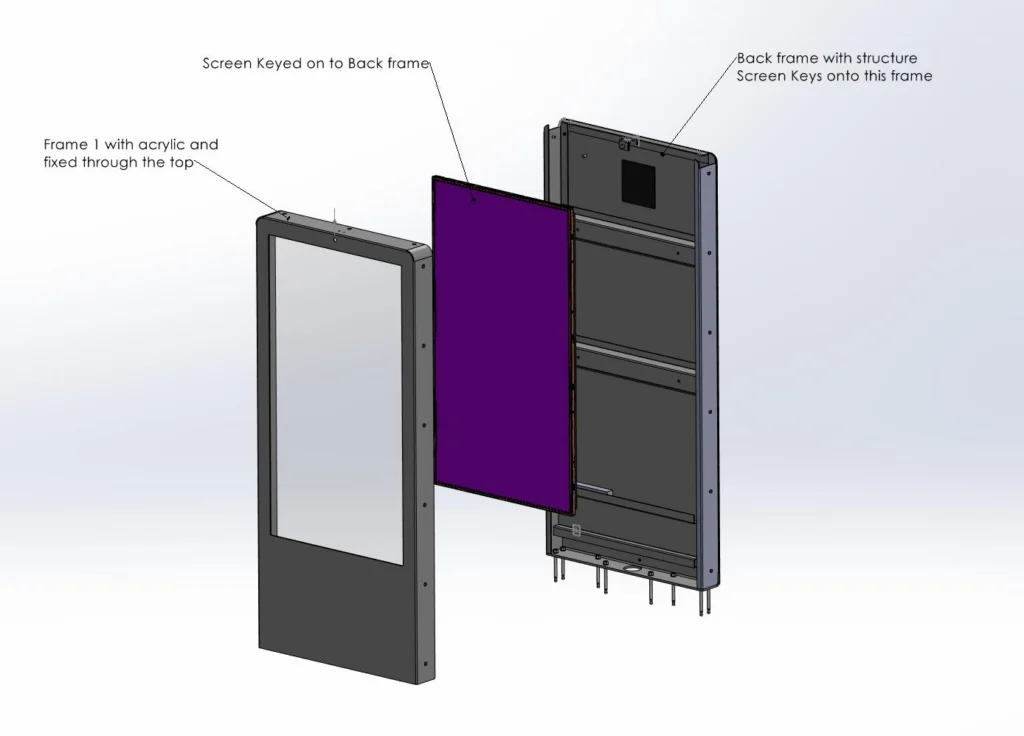
Engineering is where a digital retail display becomes a workable store fixture. Screen selection, mounting, wiring, airflow, and future service all affect the enclosure’s dimensions and construction. Addressing these requirements early can prevent expensive changes after a design has been approved.
1. Screen Placement, Viewing Angles, and Mounting
Start with the shopper’s point of view. A screen that looks prominent on a drawing may be hard to read once surrounding shelves are stocked or customers stand in front of it. Consider viewing distance, screen orientation, ambient light, reflections, and whether merchandise obstructs the content.
Engineers also need the exact screen model and technical drawings, not just its advertised diagonal size. The overall dimensions, bezel, mounting pattern, weight, cable connections, and manufacturer-required clearances determine how the screen will fit and how it can be supported securely.
2. Power Supply and Cable Management
Power and data connections should be planned as part of the fixture design, not left until installation. Cables need protected routes that avoid pinch points, sharp edges, customer access, and moving parts. A clean cable path also makes troubleshooting and replacement easier.
Determine whether the display needs a nearby receptacle, a concealed power compartment, a network connection, or equipment supplied by the retailer’s technology partner. Electrical components and installation methods should be reviewed for applicable retailer requirements, safety standards, and local codes by qualified professionals.
3. Ventilation and Heat Management
Digital screens and media players produce heat. When those components sit inside an enclosure, restricted airflow can shorten equipment life or lead to unexpected shutdowns. The fixture should respect the equipment manufacturer’s ventilation and operating-temperature specifications.
Depending on the hardware and enclosure, the solution may include open air gaps, discreet ventilation slots, or a designed airflow path. The goal is to manage heat without allowing dust, spills, or ordinary store activity to compromise the electronics.
4. Service Access and Future Replacement
Even a carefully selected display will eventually need maintenance. A damaged screen, disconnected cable, or failed media player should not require destroying a finished fixture.
Removable panels, accessible fasteners, serviceable screen mounts, and reachable cable connections help technicians inspect or replace components. It’s also worth considering how easily the fixture could accommodate a compatible replacement screen if the original model becomes unavailable.
5. Connectivity and Content Management
A screen is only one part of a digital display system. Retailers should identify who will provide the content, media player, network connection, and content management system (CMS). Some programs require centralized updates; others need different messages by region, store, or season.
Colony Display can engineer fixtures around a retailer’s existing screen or CMS partner. Sharing those technical specifications early helps the fixture and technology systems work together rather than creating conflicts late in the process.
6. Durability, Safety, and Store Conditions
Retail fixtures face repeated customer contact, daily cleaning, stocking activity, and occasional impacts. Structural supports must account for the screen’s weight and the fixture’s intended use. Materials and finishes should also suit the environment, whether the display sits in a high-traffic aisle, a beauty department, or a home improvement showroom.
Screen protection, tip resistance where relevant, accessible controls, and retailer-specific requirements should be reviewed before production. The right solution is the one that balances appearance, serviceability, and long-term function.
Designing Around the Merchandise, Not Just the Monitor
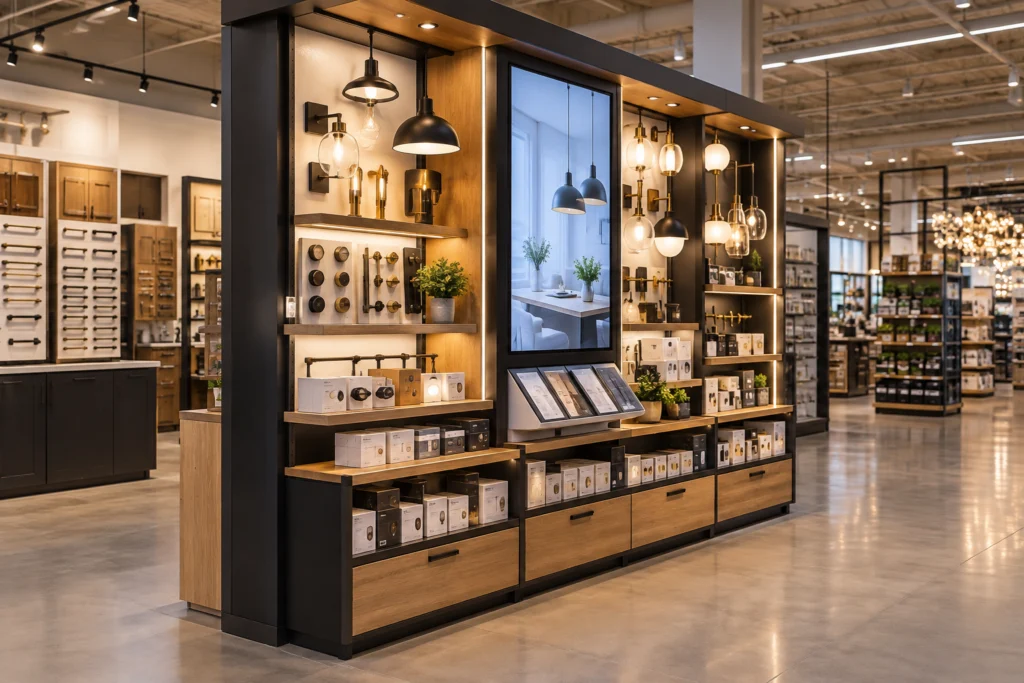
A digital retail fixture still needs to sell physical products. Screens should support that goal, not consume valuable shelf space or make the display harder to shop.
For example, a beauty fixture might use a compact screen to show a product routine while keeping testers and boxed products within easy reach. A home improvement display might incorporate a larger screen that demonstrates finishes or installation steps, paired with organized physical samples. A branded shop-in-shop environment might combine screens, lighting, and materials to create a consistent experience across stores.
Useful design questions include:
- Can customers still see, reach, and compare the merchandise?
- Does the screen add information that printed graphics or product packaging cannot provide as effectively?
- Is the display easy for store teams to stock, clean, and maintain?
- Will the fixture fit the store’s floor plan, circulation space, and merchandising standards?
- Can the design be manufactured consistently if the program expands to more locations?
These decisions are best made alongside fixture engineering and design support, so the technology, merchandising requirements, and physical structure are evaluated together.
From Concept to Installation: The Digital Fixture Development Process
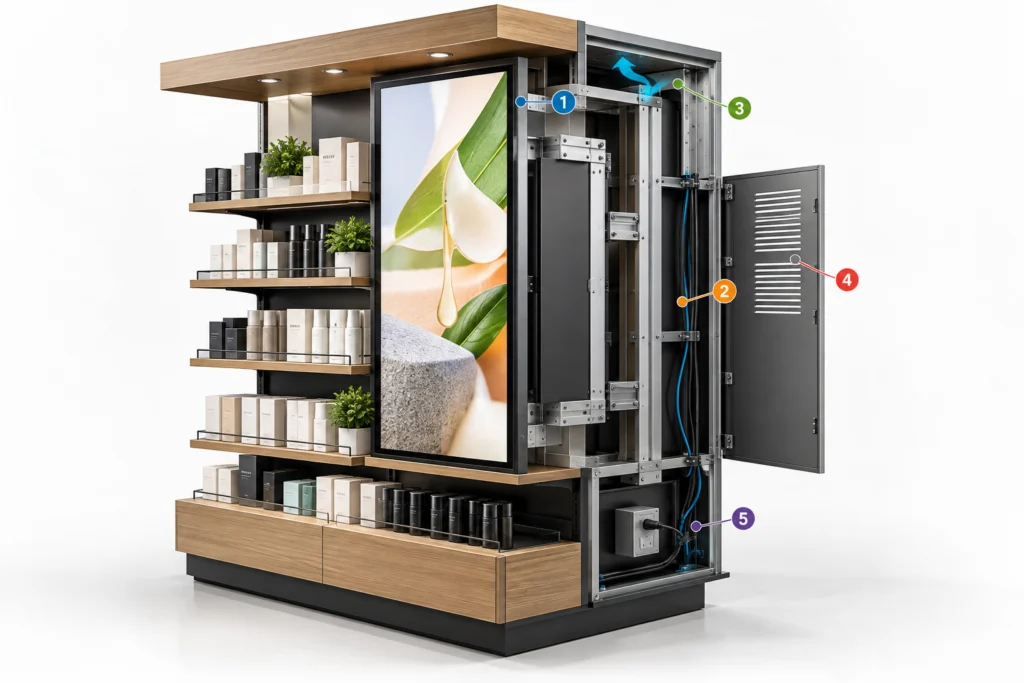
A clear development process helps align retailers, brands, design teams, technology providers, and fixture manufacturers before production begins.
Step 1: Define the Display’s Purpose and Requirements
Document what the screen needs to accomplish, where it will be installed, and what products the fixture will hold. Gather screen specifications, content requirements, power and connectivity needs, store drawings, expected quantities, and any retailer standards. These details give the project team a common starting point.
Step 2: Engineer and Prototype the Fixture
Develop the mounting structure, materials, cable paths, ventilation, and service access around the selected components. A functional retail fixture prototype can then be used to check screen visibility, product access, installation steps, fit, and practical maintenance before full production.
Step 3: Manufacture, Assemble, and Test
Once the design is approved, the fixture moves into repeatable manufacturing and assembly. Consistent screen openings, mounts, cable routing, finishes, and hardware are especially important in multi-unit programs. Agreed inspection and functional checks help confirm that the finished fixture matches the approved requirements.
Step 4: Prepare for Store Delivery and Rollout
Consider packaging, protection for electronic components, installation instructions, and any store-specific variations. For larger programs, coordinated assembly and kitting, rollout logistics, and installation planning can help fixtures arrive prepared for efficient store execution.
Common Digital Retail Fixture Mistakes to Avoid
- Choosing hardware too late: A screen selected after the enclosure is designed may not fit the mounting space or service clearances.
- Ignoring the shopper’s sightline: A screen can be technically functional yet difficult to see from the aisle or blocked by merchandise.
- Overlooking heat and wiring: Enclosed electronics require planned airflow and protected connections.
- Making service difficult: Permanent finishes or inaccessible fasteners can turn a simple repair into a major fixture modification.
- Forgetting the broader rollout: Designs that work for one prototype may be hard to pack, install, or maintain consistently across many stores.
Most of these issues are easier to address during engineering and prototyping than after fixtures reach the sales floor.
Frequently Asked Questions About Digital Retail Fixtures
Can digital screens be integrated into existing retail fixtures?
Sometimes. Retrofitting depends on the fixture’s structure, available space, mounting capacity, electrical access, ventilation, and service clearances. A design review can determine whether the existing fixture can be modified safely or whether a new purpose-built display would be more practical.
What types of retail fixtures can include digital displays?
Digital screens can be incorporated into endcaps, shelving units, kiosks, showcases, shop-in-shop environments, and other custom retail fixtures. The best configuration depends on the available space, products being displayed, and whether the screen is intended for promotions, demonstrations, or interaction.
Do digital retail displays need ventilation?
Many do. Screens, media players, and power components generate heat, especially when enclosed within a fixture. The design should follow each device manufacturer’s operating-temperature and clearance requirements and provide an appropriate airflow or thermal-management solution.
Can existing screens or a content management system be used?
Often, yes. A retail fixture can be engineered around compatible screens, media players, and an existing content management system (CMS). Confirming hardware dimensions, mounting requirements, power, connectivity, and service access early helps avoid integration problems later.
How are screens replaced or serviced in custom retail fixtures?
Serviceable fixtures use removable panels, accessible mounts, and organized cabling to allow technicians to reach electronic components. Replacement options depend on the screen model and how the enclosure was designed, so maintenance should be considered before manufacturing begins.
What information is needed to plan a custom digital retail fixture?
Start with the fixture’s intended location, products, dimensions, screen model, content goals, power and connectivity requirements, store standards, expected quantities, and rollout timeline. These details help engineering and manufacturing teams evaluate feasibility, materials, service access, and project scope.
Can custom digital retail fixtures be produced for multiple stores?
Yes. Digital fixtures can be designed for repeatable manufacturing and multi-location deployment. Standardized specifications, validated prototypes, consistent assembly methods, protective packaging, and coordinated rollout planning help reduce variation between stores.
Build a Digital Retail Fixture That Works in the Real World
Integrating a screen into a fixture involves more than cutting an opening and adding a monitor. Screen placement, structural support, power, ventilation, maintenance access, and the merchandise itself all need to work together.
Colony Display helps retailers and brands bring these requirements together through engineering and design support, prototyping, custom fixture manufacturing, and rollout capabilities. Whether you’re planning a new digital fixture program or evaluating an existing display concept, explore Colony’s Digital Displays capability or contact the team to discuss your project.